How to use it, and what to expect.
Short answers. If yours isn't here, write to me and I'll add it.
Getting started
What is Relay-It?
A shared room you drop things into. Whatever you drop lands on every device belonging to everyone in that room — in seconds, whether their screen is on or not. After 30 days it clears itself out.
How do I invite someone?
- Open the room you want them in.
- Tap Invite. You get a link.
- Send them the link however you already talk to them — text, email, WhatsApp.
- They open it, sign in with Google or their email, and they're in that room.
Join my Relay-It room — tap this link and sign in with Google or your email:
https://relay-it.io/#join=a3f9c1d84b2e7061

On a phone, add it to your home screen so it works like an app:
• iPhone: open the link in Safari (if it opened inside another app, tap the ⋯ or Share icon and choose "Open in Safari"), tap Safari's Share button, then "Add to Home Screen".
• Android: open the link in Chrome, tap the ⋮ menu, then "Add to Home screen".

On a computer: open the link, sign in, then press Ctrl+D (Windows) or ⌘D (Mac) to bookmark it.
Do the people I invite have to pay?
No. Not now, not later. One person buys Relay-It and everyone they invite uses it free, for as long as the room exists. There's no upsell waiting for them and no trial that runs out.
Do they need to install anything?
No. It runs in whatever browser is already on their phone, tablet or computer — iPhone, Android, Windows, Mac. They do sign in with Google or their email so the room knows which devices to send to, but there's no app store and nothing to download.
How do I make a new room?
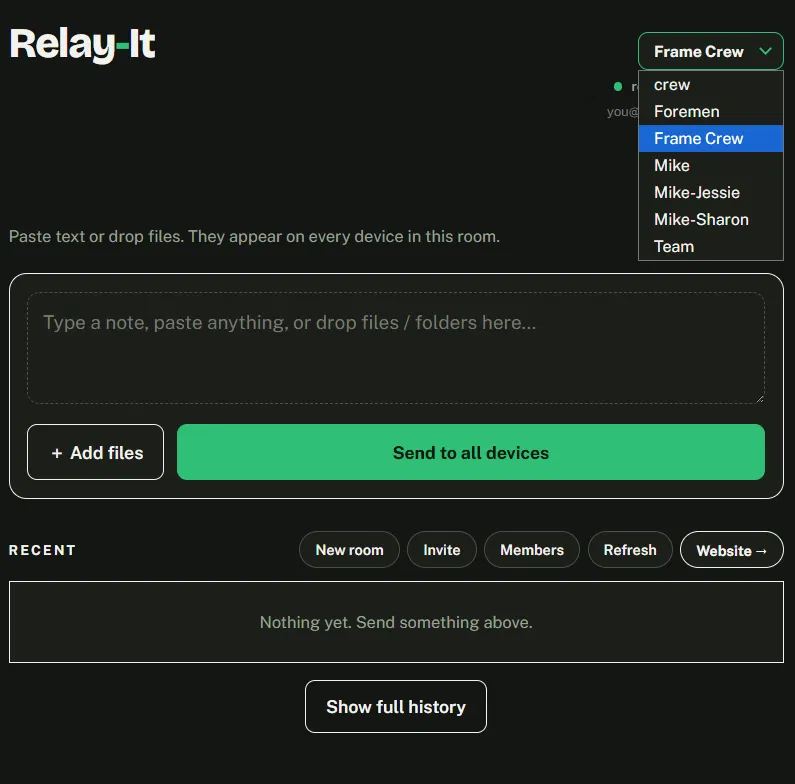
Tap New room and name it after the thing it's for — the job, the trip, the family. Switch between rooms with the dropdown at the top.
How do I put it on my home screen?
It's a web app, so you install it from the browser rather than a store — which means it takes seconds and costs nothing.
- iPhone or iPad: open relay-it.io/app.html in Safari, tap the Share button, then Add to Home Screen.
- Android: open it in Chrome, tap the three-dot menu, then Install app or Add to Home screen.
- Windows or Mac: open it in Chrome or Edge and click the install icon in the address bar.
Install it from relay-it.io itself, not from any other address you might have opened it from. Invites you create are minted against wherever you installed it.
Sending things
What can I send?
Files, folders, photos, videos, PDFs — and text. Type a note or paste your clipboard and it appears on every device in the room, ready to copy at the other end. An address, a gate code, a part number, a yes.
Is there a size limit?
Big files are fine. Anything over 6 MB uploads in pieces and picks up where it left off if your signal drops, so a large file from a job site doesn't fail at 90% and start over.
Video has a size cap that depends on your tier, and there's a hard ceiling per file above that.
Video is capped at 150 MB a file on the $8 tier and 250 MB a file on the monthly one. Anything that isn't video — files, photos, PDFs — goes up to 500 MB a file.
Does it change my photos?
Files go through untouched. Photos are the one exception: a phone photo over about a megabyte gets resized so its longest side is 2048 pixels and re-saved, which keeps it fast to send and small enough to land instantly.
In practice that means a serial number, a handwritten measurement or a shot of a panel label stays readable — unlike a photo sent by text or WhatsApp, which gets squeezed hard enough to make fine detail unusable. If you need a file byte-for-byte identical, send it as a file rather than from your photo library.
The 30 days
What happens after 30 days?
Everything in the room clears out automatically. You don't archive it, tidy it, or decide about it — it goes.
Can I keep something longer?
No, and that's deliberate. Relay-It is a pipe, not a drawer. The moment things can stay, you start managing them — folders, cleanup, running out of space, wondering whether that photo is still needed. Every cloud drive you already have does that job.
If something matters permanently, save it where it belongs at the other end. Relay gets it to you; keeping it is your filing system's job.
Rooms & people
Who can see what's in a room?
Only the people in it. Rooms aren't listed or searchable and the invite links aren't guessable.
One thing to know: the person who created the room can see everyone's email address. Everyone else just sees names — the creator can label each member, so a room reads as “Dave” and “Sharon” rather than a list of addresses. Worth remembering before you invite two customers into the same room.
Can someone delete my things?
Yes — any member can delete anything in a room. That sounds alarming and isn't, because everything expires anyway. It means whoever notices the clutter can clear it without asking permission, and nothing is lost that wasn't going to disappear on its own.
Can I remove someone?
Whoever created the room can remove anyone from it. Anyone can remove themselves at any time.
What it costs
What's the difference between $8 and $29 a month?
Mostly it's how much you get — plus two things Pro adds.
- $8 once — 3 rooms, up to 10 people in each.
- $29 a month, or $290 a year — unlimited rooms, up to 50 people in each, member management, downloading a whole room as one zip, and an email warning 7 days before clips expire.
Same 30-day expiry either way. Most people never need more than three rooms.
Is the $8 really one time?
Yes. One payment, no renewal, nothing to cancel. If you later go monthly and then stop, your $8 purchase is still there — the two don't cancel each other out.
Will the limits get worse later?
No. Any change to a limit will be a raise, never a takeaway. That's written into the Terms, not just promised here.
Privacy & trouble
Do you track me?
There are no analytics, no trackers and no third-party scripts anywhere on this site or in the app. Nobody is measuring what you do. The Privacy Policy spells out exactly what's stored and why.
Something's broken.
Tell me and I'll fix it. There's one inbox and one person reading it — see Feedback & support for what to include, or just write to hello@relay-it.io.
Is Relay-It a replacement for Dropbox or CompanyCam?
No — it does a different job, and it sits happily beside both. The comparison page lays out what each tool is for and where it stops.